Saiwenna Project Planning Resource
Motorized Shading RFQ Input Workbook
Turn window schedules, control notes and project-responsibility questions into a structured input package before requesting a motorized shading quotation.
This free XLSX planning tool helps project teams record what is known, expose missing or unresolved information, and route configuration-specific questions for review. It does not calculate price or confirm compatibility.
Version 1.0 · Updated September 2026
Who the Tool Is For
Architects & Designers
Coordinate opening references, dimensions, materials, mounting details and drawing revisions.
Dealers & Project Buyers
Prepare a structured request before Saiwenna quotation review.
Smart-Home & AV Integrators
Record requested controls, commands, feedback, gateways and responsibility boundaries.
Contractors & Installers
Keep mounting, power, pre-wire, access and commissioning inputs visible.
What Problem It Solves
Motorized shading requests often combine window dimensions, material choices, mounting details, power and control requirements, drawing references and responsibility boundaries. When those inputs live in separate emails or incomplete schedules, quotation preparation can stall. This workbook brings them into one reviewable intake structure without calculating price or guessing technical answers.
What the Workbook Collects
- Project and buyer information
- Opening references, width, height and quantity
- Product or system direction and indoor or outdoor context
- Fabric, blackout, privacy and openness requirements
- Mounting, recess, pocket and structure notes
- Motor, voltage and power direction
- RF or local, app or gateway, dry-contact, RS485, KNX or BMS and third-party control requests
- Required commands, feedback, pre-wire status and control zones
- Drawing, window-schedule and BOQ references
- Environmental conditions and special geometry or exposure
- Installation, programming and commissioning responsibilities
- Sample requirement, destination, target schedule and unresolved technical questions
Quotation-readiness workflow
The Four Workflow States
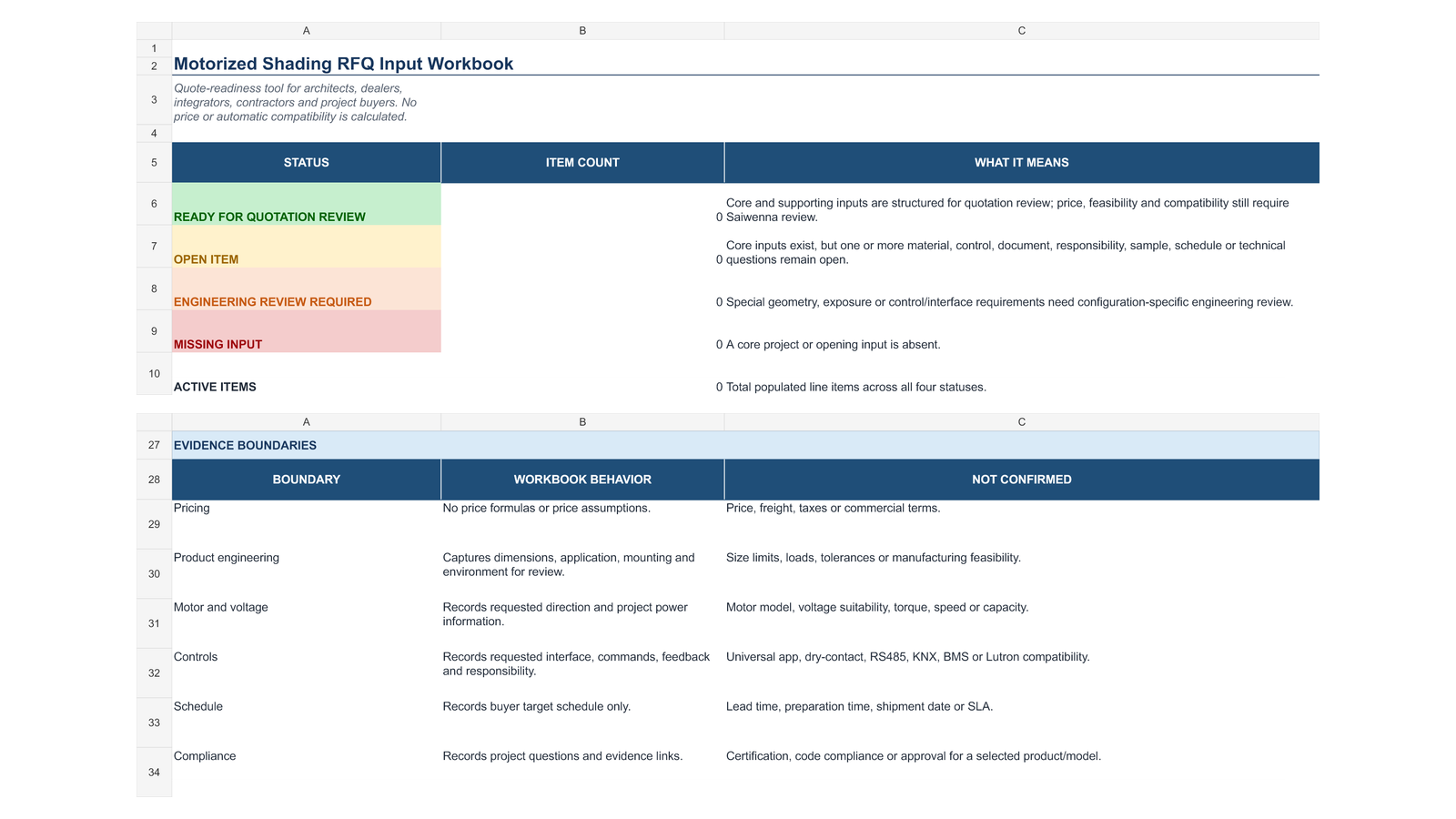
The status routes the next review step. It is not a price, feasibility or compatibility approval.
READY FOR QUOTATION REVIEW
Core and supporting inputs are structured and no engineering trigger is selected. Price, feasibility, lead time and compatibility still require Saiwenna review.
OPEN ITEM
A supporting choice, document, owner, schedule input or technical question remains open.
ENGINEERING REVIEW REQUIRED
A selected geometry, exposure, mounting or control or interface condition needs configuration-specific review. It does not mean the request is incompatible.
MISSING INPUT
A core project or opening input is absent or invalid.
How to Use It
- Complete the Project Brief first.
- Add one opening, or one truly identical configuration group, per row in RFQ Items.
- Enter only known requirements. Use the provided open or not-sure selections instead of guessing.
- Review Status and Readiness Reason for every populated row.
- Resolve missing inputs and open items where possible. Attach supporting control or geometry information for engineering-review rows.
- Send the completed workbook with drawings, window schedules, BOQ and control information where available.
What It Does Not Do
The workbook does not calculate price, freight, taxes or commercial terms. It does not select a product, establish engineering limits, promise lead time or SLA performance, confirm certification, or automatically confirm motor, controller, gateway, app, dry-contact, RS485, KNX, BMS, Lutron or other third-party compatibility. Final configuration and commercial terms remain subject to project-specific Saiwenna review.
Download the Workbook
Download Blank Workbook View Completed Example
Completed example disclosure: Fictional training example only; not a customer project, quotation, engineering approval or compatibility statement.
Technical and project resources
Related Saiwenna Resources
Use the resource that matches the next project decision or evidence requirement.
Project documentation and preparation resources.Pre-Wire & Commissioning Checklist
Blank site-coordination and handover record.
Motor & Control Integration Center
Control paths, evidence limits and required project inputs.
KNX vs RS485 vs Dry Contact
Interface-selection questions and responsibility inputs.
Lutron Integration Planning
Configuration-specific planning and required files.
Projects
Evidence-scoped project and quotation-preparation cases.
Commercial Office Projects
Office and commercial planning inputs.
Dubai Engineering Case
Mixed-system BOQ and open technical inputs.
U.S. Preconstruction Case
Pre-wire, zones and control responsibility coordination.
Frequently Asked Questions
Does the workbook calculate a quotation or price?
No. It organizes buyer and project inputs before Saiwenna quotation review. It contains no price formulas or commercial assumptions.
Does READY FOR QUOTATION REVIEW mean the system is approved?
No. It means the input row is structured for review and contains no selected engineering trigger. Product feasibility, motor and control configuration, commercial terms and compatibility still require Saiwenna review.
Can I use one row for several openings?
Yes, but only when the openings are truly identical in size, system direction, material, mounting, power and control requirements. Otherwise, use separate rows.
What should I do when information is not decided?
Use the provided open or not-sure choices and explain the question in the unresolved-questions field. Do not guess.
Why does a row say ENGINEERING REVIEW REQUIRED?
The workbook routes selected outdoor, special-geometry, structure, mounting or integration or interface conditions to configuration-specific review. The status is a review route, not a finding of incompatibility.
What files should accompany the workbook?
Where available, include the current window schedule, architectural drawings, reflected-ceiling or pocket details, BOQ, electrical or control drawings, and a control narrative. Reference the corresponding revision in the workbook.
Can the workbook confirm KNX, RS485, dry contact, BMS, app or Lutron compatibility?
No. It records the requested path and relevant responsibility inputs. Exact motor, controller, gateway, protocol, command, feedback and platform relationships require project-specific evidence and review.
Is the completed example a real project?
No. Every project, company, contact, location, dimension and requirement in the example is fictional and is included only to demonstrate the four workflow states.
Ready to Send Your Project Inputs?
Complete the workbook, keep unresolved questions visible, and include current drawings, schedules, BOQ and control information where available.